
Error 5: Main brush jammed (underside roller)
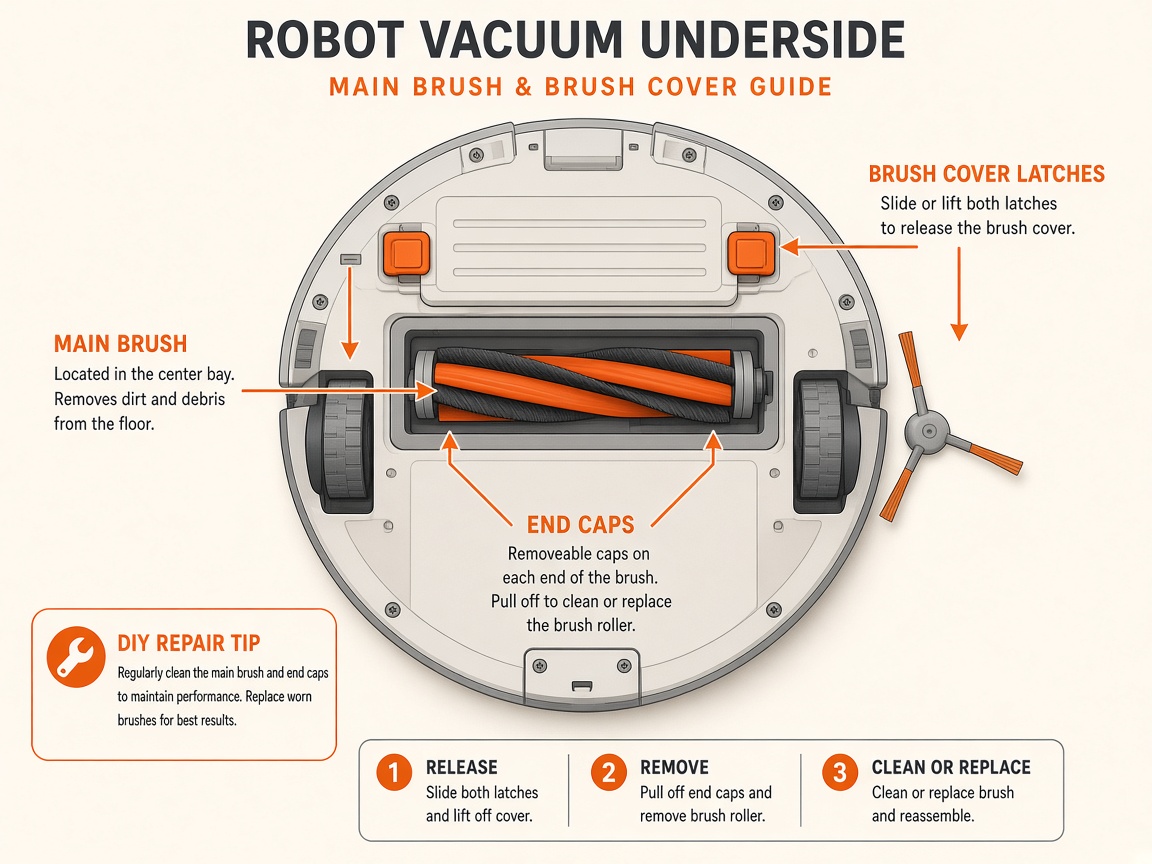
Where to look: Flip the robot — long roller brush in the middle, including end caps/bearings.
Error 5 — hair or debris wrapping the main brush, ends, or installation slots. Recurring Error 5 after a thorough clean often means a failed brush motor or gearbox.
Picture
Watch (similar Roborock models)
_Videos show related Roborock robots. Follow the written steps for Roborock Qrevo Curv._
Roborock maintenance including S8-series main brush cleaning
How to clean a Roborock main brush
Quick answers
What is wrong?
Error 5 — hair or debris wrapping the main brush, ends, or installation slots. Recurring Error 5 after a thorough clean often means a failed brush motor or gearbox.
What you might notice
- Error 5 alert
- Weak pickup or scraping noise
- Brush hard to turn by hand
Can I fix this myself?
Often yes with careful cleaning. Difficulty: easy · about 10-25 min. If unsure or it returns after parts cleaning, use mail-in repair.
What you need
- Soft cloth
- Scissors (for hair)
Do this
- Power off. Flip the robot. Press the latches and remove the main brush cover.
- Lift out the brush. Remove end caps/bearings and clear tangled hair from both ends and the fins.
- Clear hair from the brush-bay slots. Wipe the housing.
- Reinstall (orientation matters), click the cover shut, then test on carpet.
- If Error 5 returns with a clean free-spinning brush, request repair (brush motor/drive).
Parts (only if cleaning fails)
- Main brush roller
- End caps / cover if cracked
- Main brush motor (service)
Official references
- https://support.roborock.com/hc/en-us/articles/360035369172-What-should-I-do-when-error-5-occurs