
Brushroll blocked / hair wrap
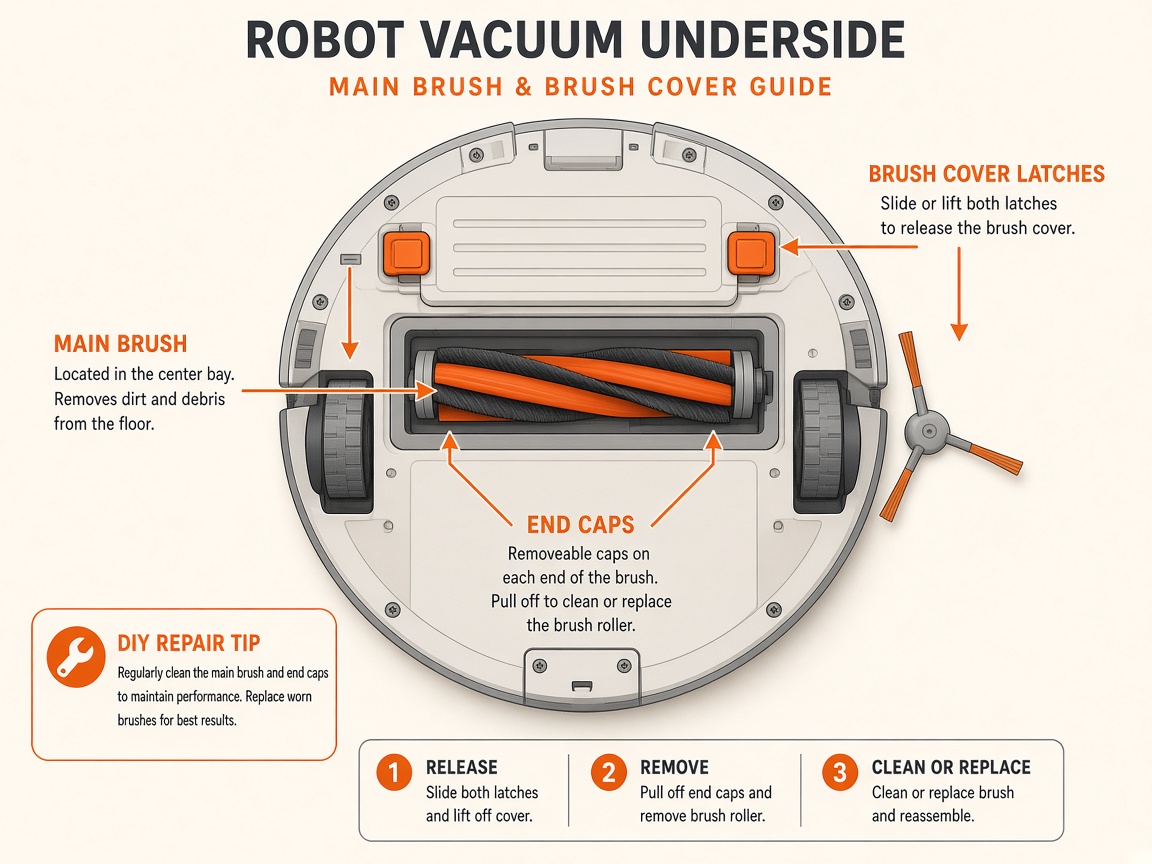
Where to look: Brushroll under the robot.
Brushroll blockage (e.g. red notification + yellow LED patterns) or hair wrap reducing pickup.
Picture
Quick answers
What is wrong?
Brushroll blockage (e.g. red notification + yellow LED patterns) or hair wrap reducing pickup.
What you might notice
- Brushroll blockage alert
- Brush will not spin freely
Can I fix this myself?
Usually yes for cleaning/clearing. Difficulty: easy · about 10-20 min. If unsure or the error returns, use mail-in repair.
What you need
- Soft dry cloth
- Scissors
Do this
- Remove debris from around and inside the brushroll so it spins freely.
- Clean side brush: unwind hair, wipe dry, snap back over the peg, spin to confirm.
- Empty dust bin and clean filters if suction is weak.
- If still blocked, request repair.
Parts (only if cleaning fails)
- None for a basic clean
Official references
- https://www.manualslib.com/guide/4242082/shark-powerdetect-rv2800s-robot-vacuum-owner-s-guide.html
- https://support.sharkninja.co.uk/en-GB/article/RV2900XEUK-Series-Shark-POWERDETECT-ThermaCharged-Robot-Vacuum-FAQs-uk