
Error 2: Clear the brushes
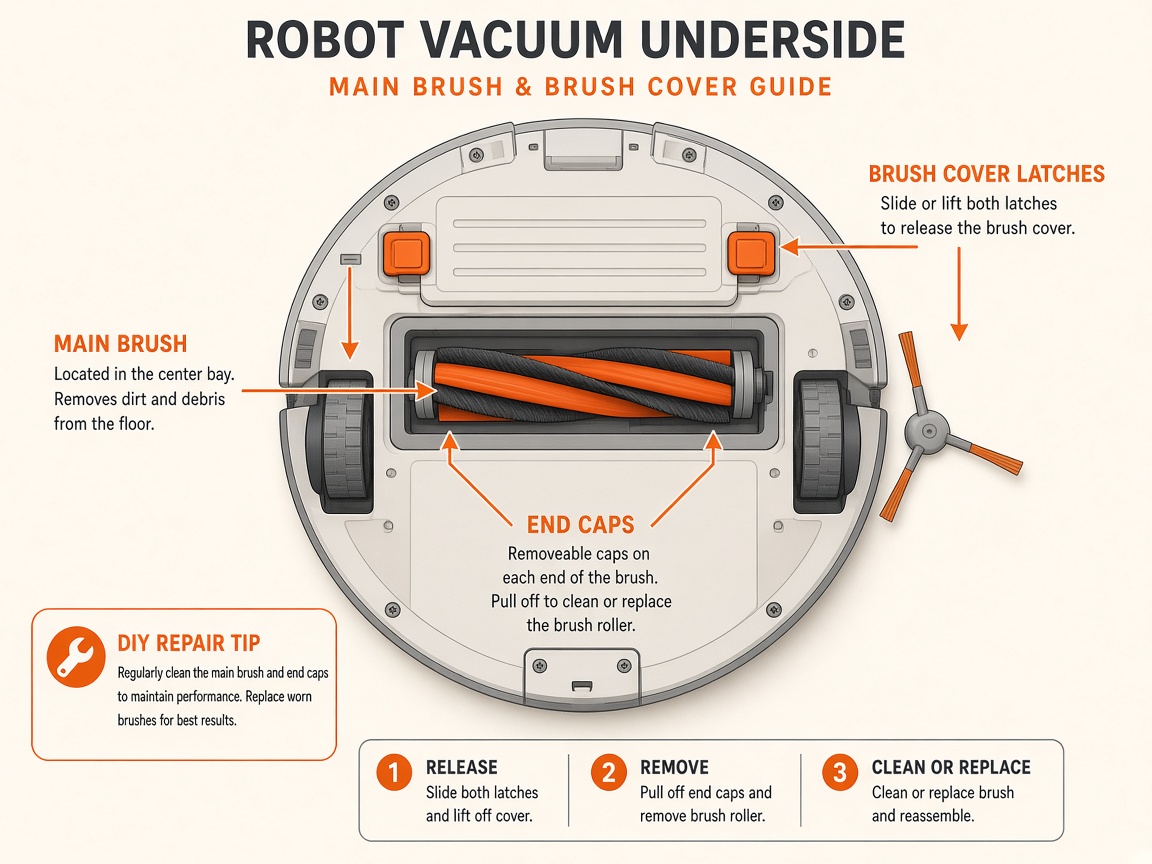
Where to look: Multi-Surface Rubber Brushes under the cleaning head.
Error 2 — brushes cannot turn (hair, debris, or thick carpet).
Picture
Quick answers
What is wrong?
Error 2 — brushes cannot turn (hair, debris, or thick carpet).
What you might notice
- Error 2 / clear the brushes
- Stops on thick carpet
Can I fix this myself?
Usually yes for cleaning/clearing. Difficulty: easy · about 10-20 min. If unsure or the error returns, use mail-in repair.
What you need
- Soft cloth
Do this
- Open the cleaning head door (green tab), remove both rubber brushes.
- Test CLEAN without brushes on a flat hard floor. If Error 2 clears, clean hair under end caps, reinstall, and retest.
- If Error 2 only on thick carpet, also test on hard floor; consider keeping off high-pile rugs.
- New rollers may need a few missions to loosen. If Error 2 persists without brushes, request repair.
Parts (only if cleaning fails)
- Multi-Surface Rubber Brushes if worn
Official references
- https://support.irobot.co.uk/s/article/31125
- https://homesupport.irobot.com/s/article/20940